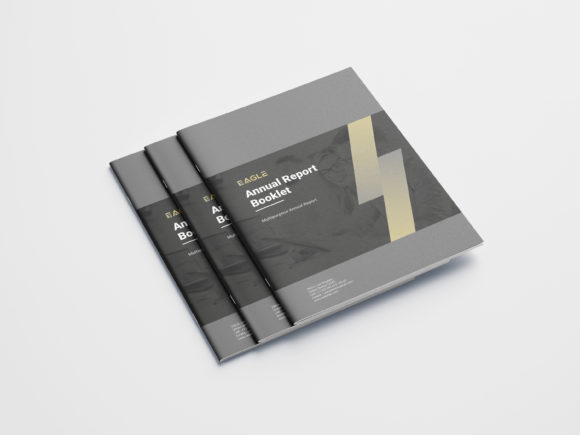
Streamlining Booklet Design with Fully Editable Templates
In today’s fast-paced business environment, having the right tools can make all the difference when it comes to creating professional and impactful marketing materials. One such tool is a Booklet Design template that is not only visually appealing but also built for ease of use and customization. Whether you're launching a new product, promoting an event, or sharing company information, the ability to quickly edit and tailor your booklet to suit your brand is invaluable.
Why Print-Ready Matters in Booklet Design
When you're designing a booklet, one of the most critical considerations is ensuring it's print-ready. A print-ready Booklet Design means the file is formatted correctly for commercial printing, reducing errors and saving time. Our templates are specifically crafted with this in mind, making them compatible with most printers and publishers. This eliminates the need for costly revisions and delays after sending the design for print.
With features like 300dpi resolution and CMYK color mode already set, our templates meet industry standards for high-quality printing. These specifications ensure that your colors appear vibrant and accurate, and your images stay sharp even at large sizes. This level of detail is essential if you want your printed materials to reflect the professionalism of your brand.
Customization Made Simple: The Power of Layered Templates
One of the standout aspects of our Booklet Design is its fully editable and layered structure. Each element — from text boxes to graphics — is separated into layers, allowing you to modify individual components without affecting the rest of the layout. This is especially helpful if you're not a seasoned designer but still want full control over your final output.
- Easy to customize any colors: Want to match your brand palette? No problem. Every color in the template is easily changeable, so you can align the design with your logo or website in just a few clicks.
- Use Google Fonts: Our templates leverage Google Fonts for accessibility and style. You can choose from thousands of web-safe fonts directly within Adobe InDesign, ensuring your text looks great on both screen and print.
- Free Font Use: We include free-to-use fonts that don't require additional licensing, which helps keep your project costs low while maintaining a polished appearance.
This level of flexibility is crucial for businesses that frequently update their branding or need different versions of the same booklet for various audiences. For instance, a marketing team might create a version for trade shows and another tailored for email campaigns — both using the same core Booklet Design, but customized in look and feel.
The Right Dimensions and Bleeds for Professional Results
Our Booklet Design uses a standard size of 8.5 x 11 inches, which is ideal for folding and binding. The inclusion of a 0.25” bleed ensures that no white edges appear after trimming, a common issue when working with custom designs. Additionally, we've added 0.5” margins throughout the document to give your content breathing room and avoid important elements being cut off during printing.
These dimensions are widely accepted in the printing industry and work well across multiple booklet formats, including saddle-stitched booklets (stapled along the fold) and perfect-bound booklets (glued spine). By adhering to these specifications, our templates help you avoid formatting headaches and ensure your final product looks clean and professional.
Adobe InDesign: The Industry Standard for Booklet Design
We build our Booklet Design templates using Adobe InDesign, the go-to software for professional designers. InDesign offers robust tools for layout, typography, and image placement, making it the best choice for producing high-quality booklets. Plus, by providing files in INDD, INDT, and INDM format, you have full access to the original design assets and can make advanced edits as needed.
If you're not familiar with InDesign, don’t worry — our templates come with a Help file to guide you through the process. This makes it easier for users of all skill levels to take advantage of the powerful features without needing expert-level knowledge. From adjusting page numbers to swapping out images, everything is designed with usability in mind.
High Resolution and All-Inclusive Graphic Elements
Every graphic element included in the Booklet Design is high-resolution, ensuring that your booklet remains crisp and clear whether viewed online or in print. This includes icons, illustrations, and background textures. Having all these elements ready to use saves you time and effort, eliminating the need to source additional graphics from third-party platforms.
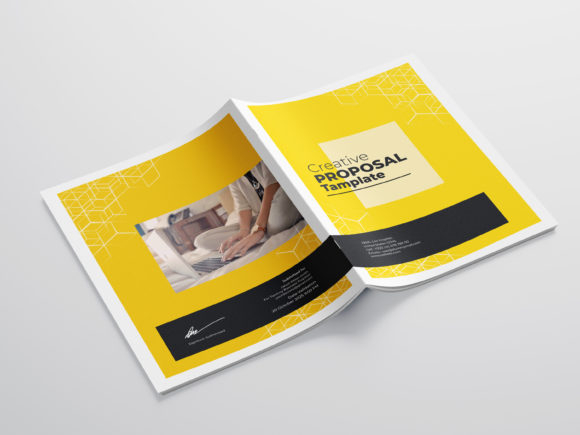
Moreover, the templates come with front and back cover pages, so you get a complete package right out of the box. These covers are also fully customizable, giving you the opportunity to add your logo, tagline, or other branding elements to create a consistent look across your materials.
File Formats and Extras for Seamless Workflow
To support a variety of workflows and user preferences, we provide multiple file formats with each Booklet Design template. These include:
- INDD: The native Adobe InDesign file for easy editing.
- PDF: A ready-to-print version for quick previewing or direct submission to printers.
- JPEG Preview: A visual reference to see how the final product will look before diving into detailed edits.
- Mock-up Files: Visual mock-ups to showcase how your booklet could appear in real-world settings. Note that photos and mock-ups used in previews are for illustration purposes only and are not included in the final download.
Having these options available gives you freedom and control. You can share the PDF with stakeholders for feedback, open the INDD file for modifications, or present the JPEG preview in a meeting. It's a versatile solution that fits into many project management and design processes.
Practical Benefits of Using a Pre-Built Booklet Template
There are several reasons why using a pre-built Booklet Design template is beneficial, especially for small businesses and startups:
- Saves Time: Skip the tedious setup process and jump straight into content creation.
- Cost-Effective: Avoid hiring a designer for every booklet you need. Customize once and reuse the template for future projects.
- Consistency: Maintain a uniform brand identity across all printed materials by reusing the same design structure.
- Professional Quality: Even if you’re not a designer, the template ensures your booklet looks polished and well-structured.
For example, a local bakery might use a Booklet Design template to promote seasonal items or special events. With the ability to change colors, fonts, and images, they can create a fresh look each time without investing in a new design from scratch.
Real-World Applications of Modern Booklet Designs
Modern Booklet Design plays a key role in various industries, from education and healthcare to retail and hospitality. Here are some scenarios where a customizable booklet can be incredibly useful:
- Event Promotion: A conference organizer might need brochures for attendees, sponsors, and media. A single Booklet Design can be adapted for each group, changing only the necessary details.
- Product Catalogs: E-commerce brands often use booklets to showcase their latest collections. With layered templates, updating product images and descriptions becomes straightforward.
- Service Brochures: Service-based businesses can explain their offerings in a structured way, using the booklet format to highlight key services and testimonials.
- Nonprofit Fundraising: Charities can produce compelling fundraising booklets with minimal design overhead, focusing more on messaging and impact stories.
Each of these applications requires a unique approach, but a solid Booklet Design template serves as a foundation that can be adapted to fit specific needs. The layered nature of the template allows for easy updates, whether you're changing contact information, adding new sections, or refreshing the visual theme.
What to Consider Before Choosing a Booklet Design Template
Before selecting a Booklet Design template, there are several factors to keep in mind:
- Print Compatibility: Ensure the template meets printer requirements for resolution, color mode, and bleed.
- Editing Capabilities: Look for templates that are fully editable and organized into layers for maximum flexibility.
- Brand Consistency: Choose a design that allows easy integration of your logo, brand colors, and fonts.
- Content Structure: Confirm that the template has enough space for your intended content and matches your message tone.
- Support Resources: Check if the template includes guides or tutorials to help you navigate the design process smoothly.
By evaluating these aspects, you can select a Booklet Design that aligns with your goals and simplifies the production process. A well-designed template doesn’t just look good — it works efficiently for you and your team.
Getting Started with Your Booklet Design Project
Once you’ve downloaded the Booklet Design template, here’s a simple workflow to follow:
- Open the INDD file in Adobe InDesign to begin editing.
- Replace placeholder text with your own content, adjusting font styles and sizes as needed.
- Swap out images with your branded visuals, ensuring they are also high resolution (300dpi recommended).
- Modify colors to match your brand identity using the provided color swatches or manual adjustments.
- Review the layout using the PDF export to check how everything looks before printing.
- Export the final version in the required format for your printer or digital distribution.
This streamlined approach minimizes the learning curve and allows you to focus on what really matters — your message and audience engagement. Whether you're a solo entrepreneur or part of a larger marketing team, the efficiency gained from using a smartly built Booklet Design template is undeniable.
Maximizing Value with an 18-Page Layout
Our Booklet Design offers a comprehensive 18-page layout, perfect for detailed presentations or extended promotional content. This length provides enough space to include sections such as:
- Cover Page
- Table of Contents
- Introduction
- Product/Service Details
- Testimonials or Case Studies
- Contact Information
- Back Cover
With each section clearly defined and editable, you can tailor the booklet to serve different purposes — whether it's a sales brochure, educational pamphlet, or client welcome kit. The structure supports both concise and elaborate content strategies, depending on your needs.
Conclusion
A well-crafted Booklet Design is more than just a pretty layout — it's a strategic asset that can elevate your brand and streamline your creative process. By choosing a template built with industry-standard techniques, you gain access to a flexible, high-quality design that can be adapted to suit your business objectives. Whether you're looking to save time, reduce costs, or maintain a consistent brand presence, our templates deliver the tools you need to succeed.